Origin story · Part 3 of 3
The last mile

In part two I said the service uses ordinary email, so it’s simple and already familiar. Easy for me to say. The answer can be exactly right and still never get asked for, because the suspicious thing is sitting in a text thread or on a piece of paper, and somebody has to get it from there into an email. Delivery companies have a name for the last stretch of the trip, the part that’s hardest and costs the most, the part that actually reaches your door. They call it the last mile. It applies. This is the story of walking it with my mother and my father.
Three familiar things
I never set out to teach my parents anything new. That was the plan, anyway. Everything would ride on three things they already did every day: forwarding an email, taking a screenshot, taking a picture with the phone. My mother had all three. My father, it turned out, was missing some.
The goal was simple: whatever lands in front of you, get it into an email and send it in. An email arrives, forward it. A text or a voicemail, screenshot it. A letter, a bill, a QR code printed on paper, take a picture of it. Same address every time, and the answer comes back to your own inbox.
My mother made it look easy
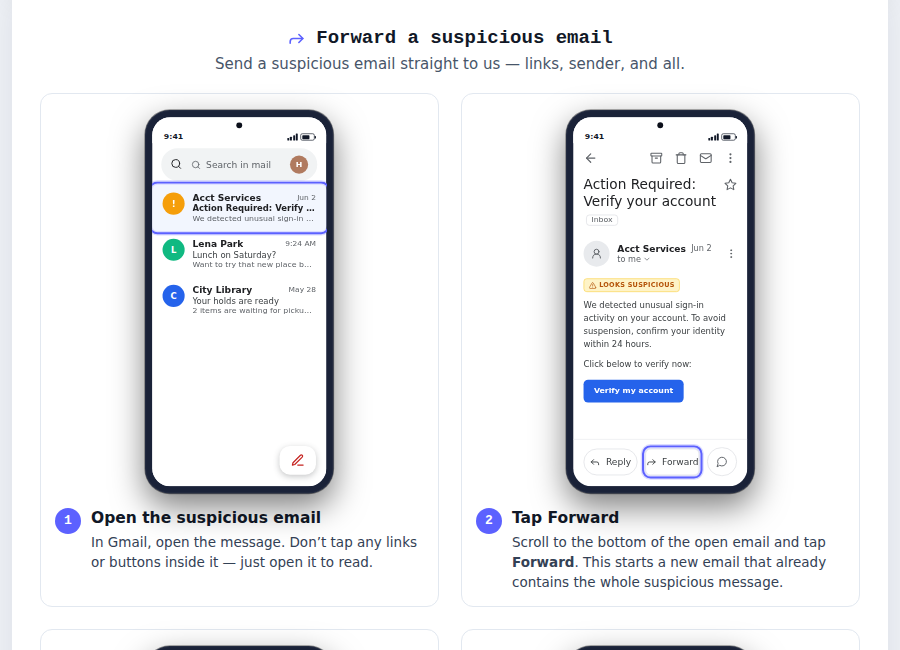
My mother was the easy one, and I’ll admit I got a little cocky. She already knew how to screenshot and forward emails. Most of what reaches her lands in her inbox, so her whole skill came down to: hit forward and let the address finish itself. Done.
Later, an aggressive mailer showed up trying to pressure them into selling their property. Paper, not pixels, and she didn’t need Columbo to know something was off. She paused, took a picture of it, and sent it in. Bazinga. That’s when I understood the habit had actually taken hold. The pause had come loose from email and attached itself to ANYTHING that wanted something from her.
My father did not
My father is another story, and it’s the story that changed how I built the product. He was on an old Android, and he’d used it the same way for years. He didn’t know how to take a screenshot, and he’d never attached anything to an email. So I taught him in person, step by step. It was slow, we got there.
Then the power button on the right side of his phone physically broke. It had been working fine. It was how he turned the screen on and off, and it was also half of the button combo you hold down to take a screenshot. On that phone, that button was the way in, and now it didn’t work. He had no interest in switching phones. It set him back further than I expected. He’d barely finished learning the thing when the phone quit on him, and every doubt he’d had about learning this stuff came right back. I couldn’t really argue with that. And the mechanics were all tied to that one button, so every one of them was about to be my problem again.
I improvised and found a gesture that would take a screenshot, and we rebuilt the habit around it. It was a temporary fix.
The lesson that stretch taught me
The pause has to be worth it. If the last mile is hard, people stop asking, and it doesn’t matter how good the answer is. I’d spent months making the answer good. The broken button taught me the last mile needed just as much work, and I’d barely started on it.
So I wrote it all down
That’s why the walkthroughs exist. After the broken button I stopped assuming any step was obvious. I broke every skill down for every combination of the major email apps and phones, each one its own walkthrough, each one printable. If you’d rather tape a page to the refrigerator door than trust your memory, there’s a page for that. None of it is glamorous, but the last mile is where the whole thing lives or dies, so that’s where the work went.
The dead button, again
A phone you can’t turn on or off isn’t much of a phone. He needed a new one, and his first thought was another Android, same as always.
Action button and Apple Email
I did tell him what to buy: an iPhone. Not because I think iPhones beat Android, and not out of any brand loyalty. It came down to one question: who can help him when he gets stuck? Nobody around him could help with an Android. My mother can help with an iPhone, because she has one herself. She’d be the first to tell you she’s no expert. She doesn’t need to be. Same phone, same buttons, same Mail app.
Scammers do their best work on people who have no one to ask. Isolation is a real risk factor, right up there with fear and urgency, and the fix is collective: a community, even a tiny one of two people, protects better than any rule you memorize alone. So he bought the iPhone, and the deciding feature was my mother.
One button
He landed on a new iPhone, one of the newer ones with the Action Button on the side. If you have one, you can set it up once so that a single press sends whatever is on the screen to the service. For him, that was the game changer. A suspicious text arrives, he presses the button, and the answer shows up in his email. Forwarding an email is still forwarding an email. But screenshot and take-a-picture, the two he actually uses most, are now one press.
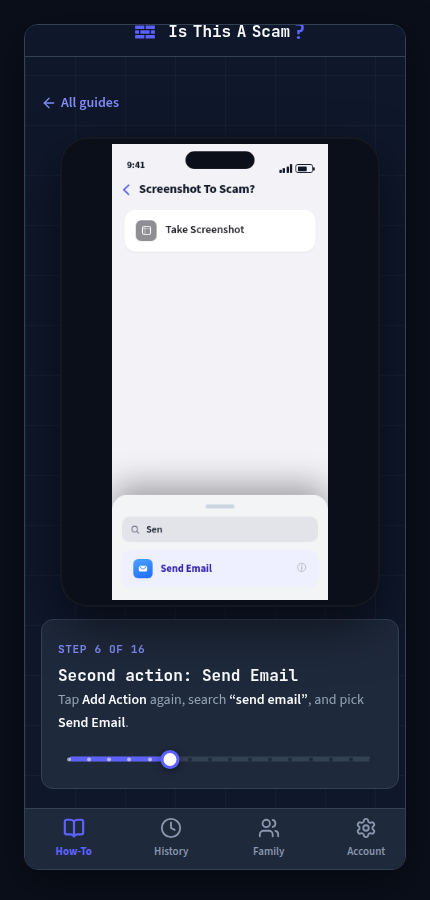
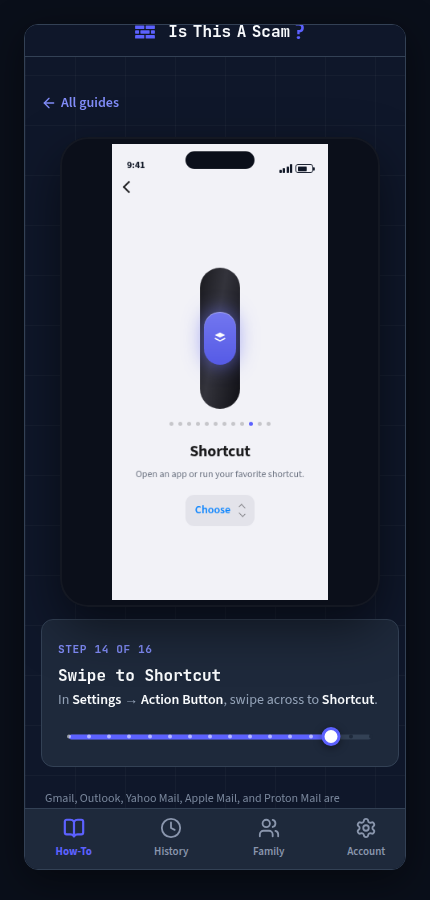
I want to be straight about who this applies to. It takes two things: Apple Mail, and a newer iPhone with that button. The forward, screenshot and take-a-picture routine works the same on every phone, and it always will.
My favorite part
I noticed he kept opening his email to see if the answer had come back yet. So I asked him: do you want to know when it arrives? “Ya, because I keep checking.” I showed him how to mark the service as a VIP contact in his mail app, and now the replies pop up on his screen instead of waiting quietly in the inbox. He was checking because he cared about the answer. Bazinga.
Two roads, one habit
Two parents, two roads to the same place. One needed a broken button, a printed page, and eventually one good button to press. Both of them now pause and ask, about emails, texts, voicemails, letters, and anything else that wants something from them. That was the goal from the start: make asking easier than worrying alone.
If you’re the designated tech person in your family, this one’s for you. The walkthroughs are built for the phone and email app your people actually have, and I don’t expect anyone to pay before they get a chance to try it.
Start your free trial